

We’ve added the Recite Me accessibility toolbar to our resident and corporate websites to make it easier for everyone to use.
Everyone’s needs are different, and we serve a diverse range of residents with different backgrounds, abilities and preferences. The toolbar is designed to give you simple, practical ways to access information in a way that works for you.
Whether you want to listen to content, change how it looks or read it in another language, you can choose the tools that suit you best and feel more confident using our services.
How to access the Recite Me toolbar
You can open the Recite Me accessibility toolbar in two simple ways on our website.

At the top of the page, there is a “Recite Me” option in the main header navigation. Selecting this will open the toolbar.
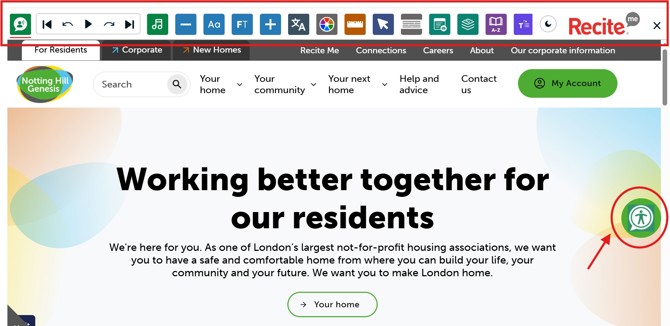
You can also access it by clicking the green accessibility icon with a person symbol, which appears on the right-hand side of the screen. This icon stays visible as you move through the site, so you can open the toolbar whenever you need it.
Both options take you to the same tool, so you can choose whichever is easiest for you.
Feature breakdown
Our accessibility toolbar offers a wide range of features to help residents personalise their experience on our website.
Below is an overview of the most popular features available and how they can support you.
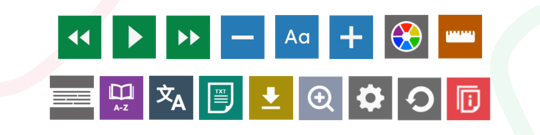
For a full breakdown of all features and how to use them, you can visit the Recite Me website
Text to speech reads the text on the page out loud. You can hear text when you hover over it when Play Automatically is selected, or press Read whole page of content to listen to everything on the page.
Movable player controls let you place the player controls where you want. You can also change the voice and reading speed.
Focus Audio, is designed to support concentration and deeper reading of digital content by introducing gentle background audio.
Designed to sit just above silence without becoming distracting, the feature aims to support neurodivergent users and people experiencing cognitive fatigue when reading longer or more complex information online.
Font Options let you adjust the website’s font, line height, and character spacing so you can find the style that works best for you. Use the + and - buttons to increase and decrease the font size.
Focus Text highlights key parts of words to make reading easier and aims to helps users with reading conditions such as dyslexia follow text more smoothly.
With over 130 supported languages, allowing a user to change the website content to their preferred language easily. Any language with a text-to-speech icon can also be read aloud when Text-to-Speech is active.
Change background and text colours of the webpage, enable dark mode for the toolbar, or view the page in Monochrome.


